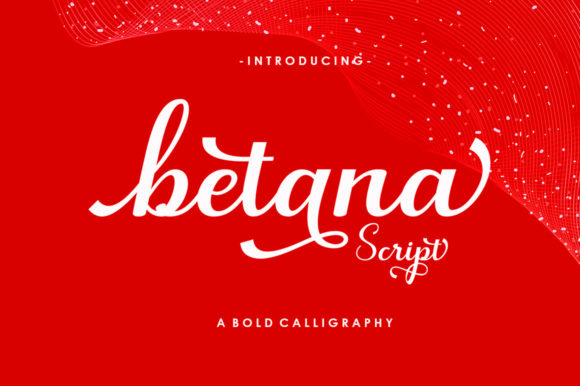
Betana Script Font for Handmade Creatives
It started with a candle label — soft ivory kraft paper, a sprig of dried lavender tucked beside the jar, and that moment when I opened my design file and realized the font I’d been using for months suddenly felt… tired. Not wrong, exactly — just too familiar. So I scrolled through my font library, paused at Betana Script, and typed “Honey Lavender” in preview mode. Instantly, the words curved like ribbon, warm and gentle, with just enough bounce to feel handmade — not digital, not stiff, but *alive*. That’s how Betana Script landed in my workflow: not as another Fonts download, but as a quiet upgrade to the voice of my small-batch goods.
Betana Script for Wedding Invitations and Elegant Branding
When you’re designing wedding stationery — even just a single welcome sign or a set of place cards — every detail carries weight. Betana Script is a Script Handwritten typeface that balances playfulness with poise: its lowercase ‘g’ has a subtle loop, the ‘y’ ends in a graceful flick, and capitals carry a delicate lift — never heavy, never fussy. I used it for “Mr. & Mrs. Thompson” on a linen-fold invitation suite, pairing it with a clean sans serif (like Montserrat Light) for body text. The contrast gave elegance without stiffness — perfect for couples who want charm over formality. Because Betana Script is PUA encoded, I could access alternate characters and swashes directly in Canva and Cricut Design Space, swapping in a flourished ‘W’ for the welcome board header without hunting through glyphs panels.
Betana Script for Candle Labels and Small-Batch Packaging
Candle labels live in tight spaces — 2” x 3” sticker real estate where legibility and charm must coexist. Betana Script shines here as a Script Handwritten display font, but only for short phrases: scent names (“Vanilla + Sea Salt”), collection titles (“Coastal Line”), or brand monograms. I tested it at 14pt on matte vinyl — crisp, readable, and unmistakably hand-drawn. For longer info (ingredients, safety warnings), I layered in a simple serif (like Playfair Display) underneath. Pro tip: avoid using Betana Script below 10pt on physical labels — the fine joins between letters can blur during print or cut. But at 12–18pt? It reads beautifully on jars, boxes, and boutique tags — adding perceived value before the customer even smells the wax.
Betana Script for Printable Wall Art and Digital Downloads
As a printable creator, I know buyers scan listing thumbnails first. A bold, friendly script like Betana Script makes quotes pop instantly — think “Bloom Where You’re Planted” centered on sage-green linen texture, or “Good Things Take Time” arched above a minimalist watercolor border. Because Betana Script is PUA encoded, all alternates and ligatures are accessible in standard font menus — no need for advanced software. That means Etsy buyers using free tools like Google Slides or basic Canva can still access the full character set when customizing their purchased templates. I’ve embedded Betana Script into editable PDFs and SVG bundles (with commercial license confirmation!), and customers consistently comment how “easy it was to personalize” — a direct result of thoughtful Fonts integration.
Betana Script for Greeting Cards and Hand-Stamped Stationery
Greeting cards thrive on warmth — the kind that says “I chose this just for you.” Betana Script delivers that feeling naturally. Its playful characters — especially the bouncy ‘a’, the soft ‘e’, and the tapered ‘t’ — mimic ink-on-paper rhythm without looking traced or artificial. I printed a batch of birthday cards using Betana Script for the inside sentiment (“You Make Every Day Brighter”) and paired it with a thin serif for the sender’s name. When scanned for mockups, the font held its texture beautifully — no pixelation, no flattening. For hand-stamped versions, I converted the text to outlines in Illustrator first, then sized it to match traditional rubber stamp proportions (16–20pt works best). It’s a Script Handwritten font that respects analog craft while performing flawlessly in digital prep.
Betana Script for Tote Bags, Mugs, and Merchandise Design
Screen-printed tote bags and ceramic mugs demand fonts that hold up at scale and distance. Betana Script works beautifully for front-and-center phrases — “Hello, Sunshine”, “Made With Love”, “Keep It Simple” — especially when centered and given generous letter spacing. I ran test prints on natural cotton canvas: at 48pt, the curves stayed smooth; at 72pt, the swashes added movement without overwhelming. Because it’s a premium Script Handwritten typeface, it avoids the “clip art” look common with free scripts — giving your merchandise instant distinction. Just remember: always check your commercial license before selling physical products. Betana Script includes full licensing for merch, so whether you’re printing one-off samples or bulk orders, you’re covered.
Betana Script for Planner Pages and Seasonal Printables
Planner lovers notice typography. A weekly spread with Betana Script headers (“Focus”, “Gratitude”, “Celebrate”) adds intentionality — like the planner itself was designed *with* care, not just for it. I use it for section dividers and decorative accents, never for dense daily grids (that’s where clean sans serifs belong). For holiday printables — think “Jingle All the Way” banners or “Cozy Season” journal prompts — Betana Script leans into the joyful, unhurried mood without veering into childishness. Its consistent x-height and open counters keep it highly legible even when scaled down for mini-planner inserts. As a Fonts choice for seasonal collections, it builds continuity across your shop — customers begin to recognize your aesthetic before they read a single word.
How to Use Betana Script With Cutting Machines Like Cricut and Silhouette
If you cut vinyl, iron-on, or paper with Cricut Design Space or Silhouette Studio, Betana Script performs reliably — as long as you convert to outlines before cutting. Its moderate stroke contrast and clear entry/exit points prevent snags on intricate cuts. I recommend testing at 1.5x size first, then scaling down. Avoid using the lightest swash variants for small stickers (<1.25”) — stick to the standard character set for crisp edges. And always install the font locally (not via cloud fonts) to ensure full PUA access in your cutting software.